May 22, 2026
Summit AI Notes 1.9
New Features
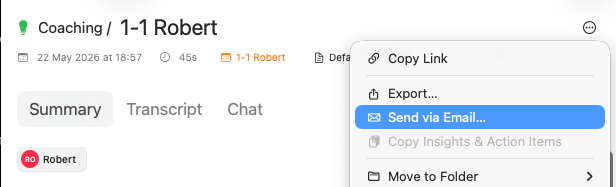
Send a meeting summary by email directly from Summit.
In case there is a calendar event attached to the document, Summit will fetch list of attendies.
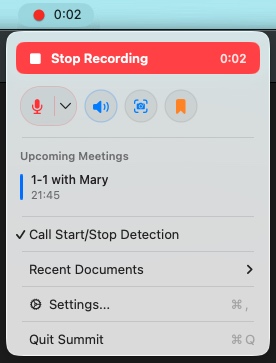
New menu bar controls
Start and stop recordings, capture screenshots, add bookmarks without opening the app. It also shows your upcoming meetings at a glance.
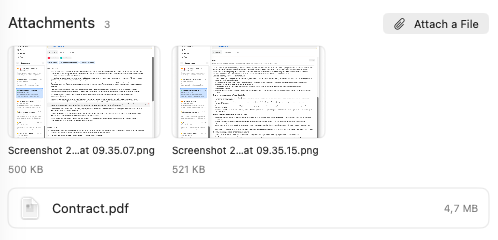
Screenshots and attachments
Capture a screenshot of the app you’re recording and attach it automatically. Attach files to a recording, with per-attachment delete.
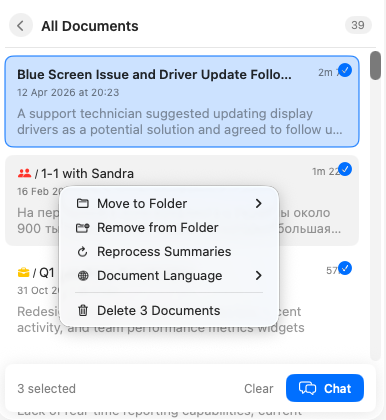
Bulk actions
Scope chat and bulk actions to the documents you’ve selected in the sidebar.
Other features
- Add shared context to a folder so summaries better reflect that group of meetings.
- Import existing audio files with a new Import Audio button next to the sidebar Record button.
- Streaming chat responses for faster, real-time answers.
- New export options dialog replacing the old export menu items.
Improvements
- Smarter auto-record: optionally include tentative calendar events, see response status icons, detach a calendar event from a recording, and auto-start recording for an in-progress meeting after a manual stop.
- Local model recommendations based on your Mac’s memory and chip, with download progress shown in the toolbar and prompts to upgrade older default models.
- Summaries now use the recording’s date and include precise timestamps in key insights and action items.
- Faster downloads for AI models.
- Summarization pauses when speakers are unidentified, so you can label them first.
- Action items assigned to a person now appear on their profile.
- Short recordings skip unnecessary cleanup and summarization.
- Player now shows hours for long recordings.
Bug Fixes
- Calendar now updates automatically when system events change, refreshes reliably, and renders event times accurately.
- Background processing no longer runs while a recording is active.
- Notes are saved when you stop recording, no longer lose text, and refresh correctly when switching documents.
- Key insights keep their chronological order.
- Recording duration is now consistent between the document header and the audio player.
- Fixed multi-select action bar layout.
- Prevented database loss when moving your storage folder, with a confirmation before migrating into a non-empty folder.
- Removed stray transcription artifacts from the output.