Connect an MCP Client
Let an assistant search Summit meetings and read transcripts, topics, and action items through the local MCP server.
Last updated: October 24, 2026
Summit’s local MCP server lets a compatible assistant find meetings, search transcripts, and read transcripts, topics, and action items. For example, you can ask an external assistant to compare recent client meetings or collect open commitments from a project.
The server listens on 127.0.0.1, so the client connects on the same Mac. Keep Summit running while you use it.
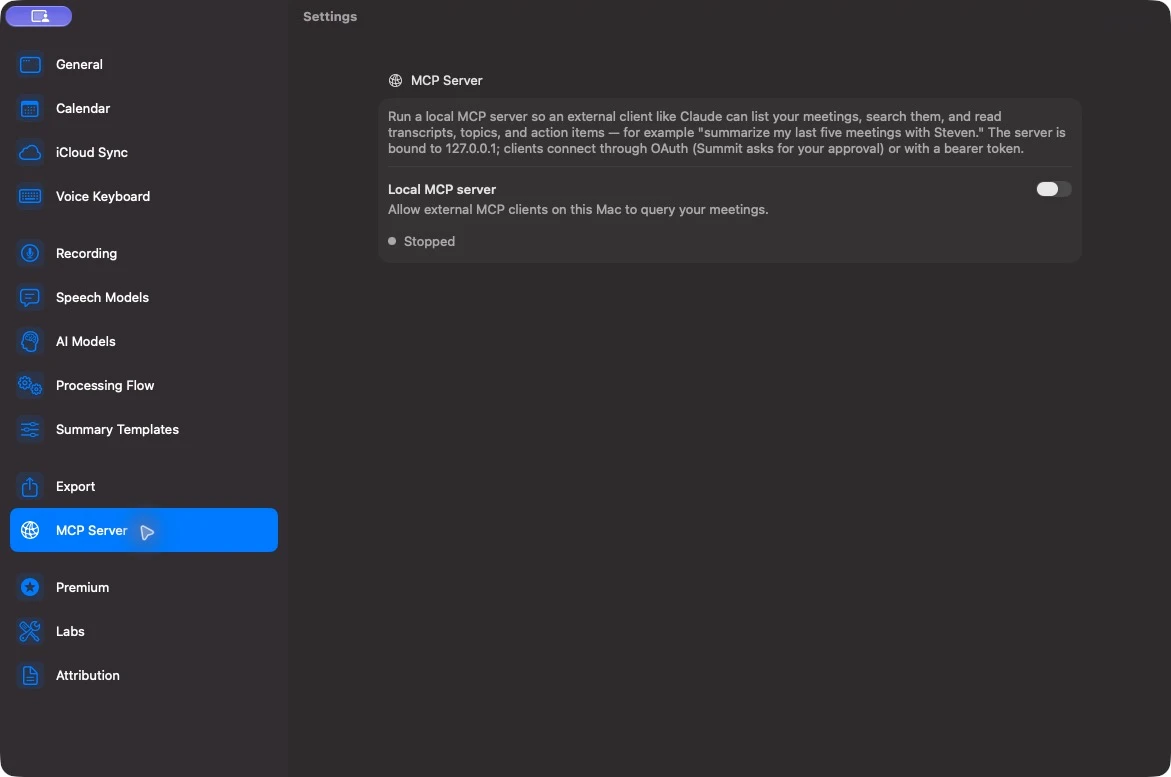
Enable the server
- Open Settings → MCP Server.
- Turn on Local MCP server.
- Confirm the status says Running on http://127.0.0.1:8765/mcp. If you changed the port, use the actual Server URL shown in Settings.
- Add that URL to a client with native HTTP MCP support. Approve its connection when Summit asks.
Clients that support MCP authorization use OAuth and need only the URL. Clients without OAuth support can use the Bearer token shown under Connection.
The authorization gives a client access to your meeting library. The local server does not choose where an external assistant sends the content it reads; that depends on the client and its AI provider. Use a client whose data handling matches your needs.
Use the Summit plugin in Claude Code
Keep Summit’s server on port 8765 for the marketplace plugin. Run these commands inside Claude Code:
/plugin marketplace add SummitNotes/mcp-markeplace
/plugin install summit@summit-ai-notes
The repository name is spelled mcp-markeplace. These commands are also available to copy in Summit’s settings.
If the Claude Code session was already open, restart it or run /reload-plugins to load the plugin. Use a Summit tool and approve the first connection in Summit. You can then ask, for example:
- “Find my last five meetings with Ana and summarize the unresolved questions.”
- “Search the launch meetings for discussion of the rollout date, and show the source passages.”
- “List the action items from this week’s client meetings.”
Ask the assistant to find the relevant meetings first, then read the transcripts or action items. For a long transcript, the tools return pages that the client can continue reading.
Configure Claude Desktop
Summit’s settings provide a Copy configuration button for Claude Desktop. The generated configuration uses the mcp-remote bridge, which needs Node.js and npx available on the Mac.
Add the entry to the mcpServers object in your claude_desktop_config.json, preserving any servers already configured:
{
  "mcpServers": {
    "summit": {
      "command": "npx",
      "args": [
        "-y", "mcp-remote", "http://127.0.0.1:8765/mcp",
        "--allow-http", "--transport", "http-only"
      ]
    }
  }
}
Use the URL from Summit if your port differs. If Claude Desktop cannot find npx, run which npx in Terminal and use that full path as the command. Reopen the client after changing its configuration and approve the connection in Summit.
Manage access
Under Connection, Authorized clients shows the OAuth client count. Revoke all revokes those authorizations; clients need to connect and be approved again.
Treat the bearer token as a password. Anyone who has it and access to this Mac can read your meetings. Regenerate token invalidates the previous token, so update any clients that use it. OAuth authorizations and the bearer token have separate controls.
After you quit and reopen Summit, OAuth clients need fresh approval and the bearer token changes. Update bearer-token clients with the new token shown in Settings. OAuth clients can reconnect using the same server URL and request authorization again.
Turn off Local MCP server to stop serving requests.
Troubleshoot a connection
- Failed to start: read the reason beside the status. Another process may be using the port; choose a free port for a manually configured client.
- Claude Code plugin cannot connect: keep Summit running and set the server port to 8765, which the plugin expects.
- Authorization fails: approve the connection in Summit, or update the client after revoking access or regenerating a token.
- Client returns an incomplete overview: narrow the requested date range and ask it to read all relevant transcript pages. Finding a meeting is different from reading its full transcript.
- A meeting cannot be found: confirm it exists in the Mac library and is not in Recently Deleted. Use Summit’s own search to check the title, people, and tags.