Search Your Meetings
Find notes and transcript passages with text, people, tags, folders, and dates.
Last updated: October 24, 2026
Search helps you find a meeting, locate the passage where something was discussed, or collect a set of meetings to ask AI about.
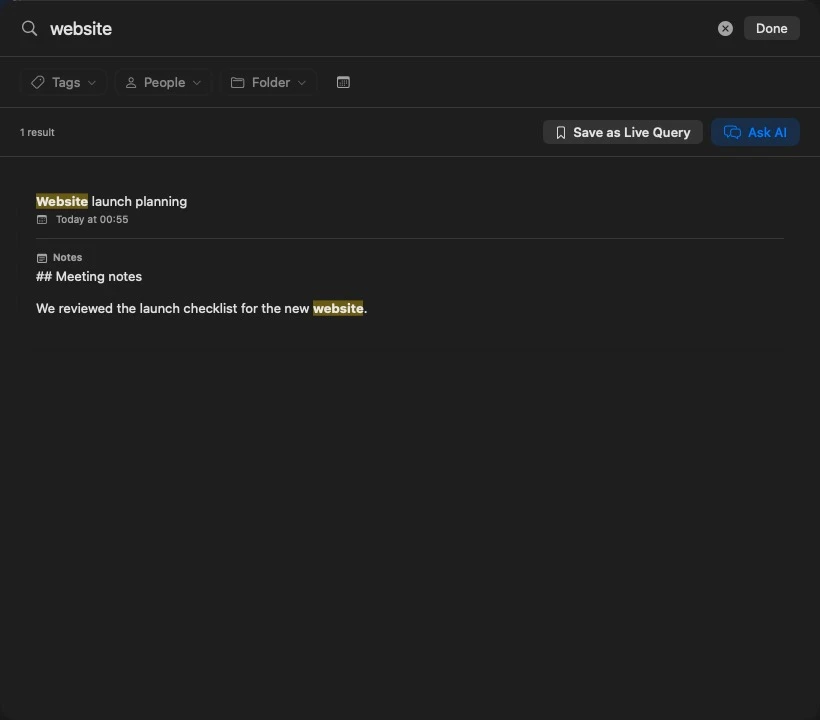
Find a discussion
- Open search from the toolbar or choose Edit → Find… (Command-F).
- Enter the topic or words you remember, such as
renewal pricingorlaunch postponed. - Use the Tags, People, Folder, and date controls to narrow the results.
- Open a meeting card to read the document. When a result includes a matching transcript passage with a timestamp, select that passage to open the meeting at that moment.
Summit combines text matching with semantic search when its local search model is ready. Specific phrases and project terminology help distinguish related discussions. Results are evidence to review: check the matching passage when an exact decision or quote matters.
You can use filters without entering text. For example, select a person and a date range to list their meetings, newest first. Remove a filter chip or use Clear to widen the search again.
Combine filters
Different filter types narrow each other. Selecting the Client Alpha folder and the pricing tag returns meetings that match both. Selecting several values within the same type matches any of them: two selected people find meetings with either person.
Use the pickers when several people or folders have similar names. A selected picker entry identifies that specific item. A name typed in a query can match more than one item with that name.
Type filters directly
You can also enter prefixes in the search field. Put quotation marks around values that contain spaces.
| Prefix | Example | What it finds |
|---|---|---|
tag: | tag:pricing renewal | Meetings with the tag, ranked for the remaining text |
person: | person:"Ana Lopez" budget | Meetings associated with that person; speaker: is also accepted |
folder: | folder:"Client Alpha" | Notes in the matching folder scope |
date: | date:2026-10-24 | Notes created on that day |
action_item: | action_item:"send proposal" | Meetings with an incomplete action item containing those words |
priority: | priority:high | Meetings with an incomplete action item at that priority |
assignee: | assignee:Ana | Meetings with an incomplete action item assigned to a matching name |
For date:, you can use today, yesterday, last-week, or a date in YYYY-MM-DD format. last-week means the seven days ending today. The date picker is easier for a custom range. Dates filter the note’s creation date, and typed date filters apply together with the date picker’s selection. An unreadable date shows a warning and does not narrow the results.
Action-item prefixes work together on the same incomplete item. For example, action_item:proposal priority:high assignee:Ana requires a high-priority proposal item assigned to Ana; three separate items cannot satisfy those three conditions.
To find the parts of a transcript spoken by someone, open the meeting and use its transcript controls, or ask a scoped chat question. The library’s People filter selects meetings that include the person.
Ask AI about the results
Choose Ask AI to open a chat scoped to the meetings in the current result set. For example, filter to a client and the last month, search renewal, then ask which concerns remain unresolved.
Choose Save as Live Query when you want to reuse a search. Review the name, filters, date rule, and instructions in the editor before saving. A live query can resolve its meeting scope again as your library changes. See chat and live queries for the full workflow.
When a note is missing
Clear the filters first, then try a distinctive word from the title or transcript. Archived notes and notes in Recently Deleted are excluded from library search. Check the archive and unarchive the note, or restore a deleted note, before searching again. Reindexing does not change either status.
If existing notes still do not appear or results look outdated, open Settings → Labs → Reindex All Documents. Let the rebuild finish and review its result. A large library can take several minutes. See troubleshooting if the rebuild reports passages it could not index.